> ## Documentation Index
> Fetch the complete documentation index at: https://docs.trio.com.br/llms.txt
> Use this file to discover all available pages before exploring further.
# Payin
The pay-in flow shall be used whenever you want users to cash in some money with almost zero friction.
In order to generate a pay-in through our Checkout SDK, you must create a Checkout Session. Below, there are some important parameters that you will need to pay attention to (\* for required fields):
* **options**
* `session_type`\*: session type, in this case **payin**.
* `expiration_in_seconds`: integer value. If set, the Checkout session will only remain active up until this time. If not, the default time is 300 seconds (5 minutes).
* **transaction**
* `tax_number`\*: the document/tax number (CPF/CNPJ) that represents the person you intend to receive money from.
* `amount`\*: Value of the deposit. Always represented in cents.
* `phone_number`: Additional information about the person you intend to receive money from.
* `email`: Additional information about the person you intend to receive money from.
* `redirect_url`: the URL the user will be redirected after completing an open finance transaction. (default will be a Trio confirmation URL)
#### **White label**
You can also customize your end-user experience by utilizing the Checkout as a *white label*. You can do so by utilizing the `options` field, with the respective `xxxx_color` fields. Below, you can see an example of a wholly implemented customization:
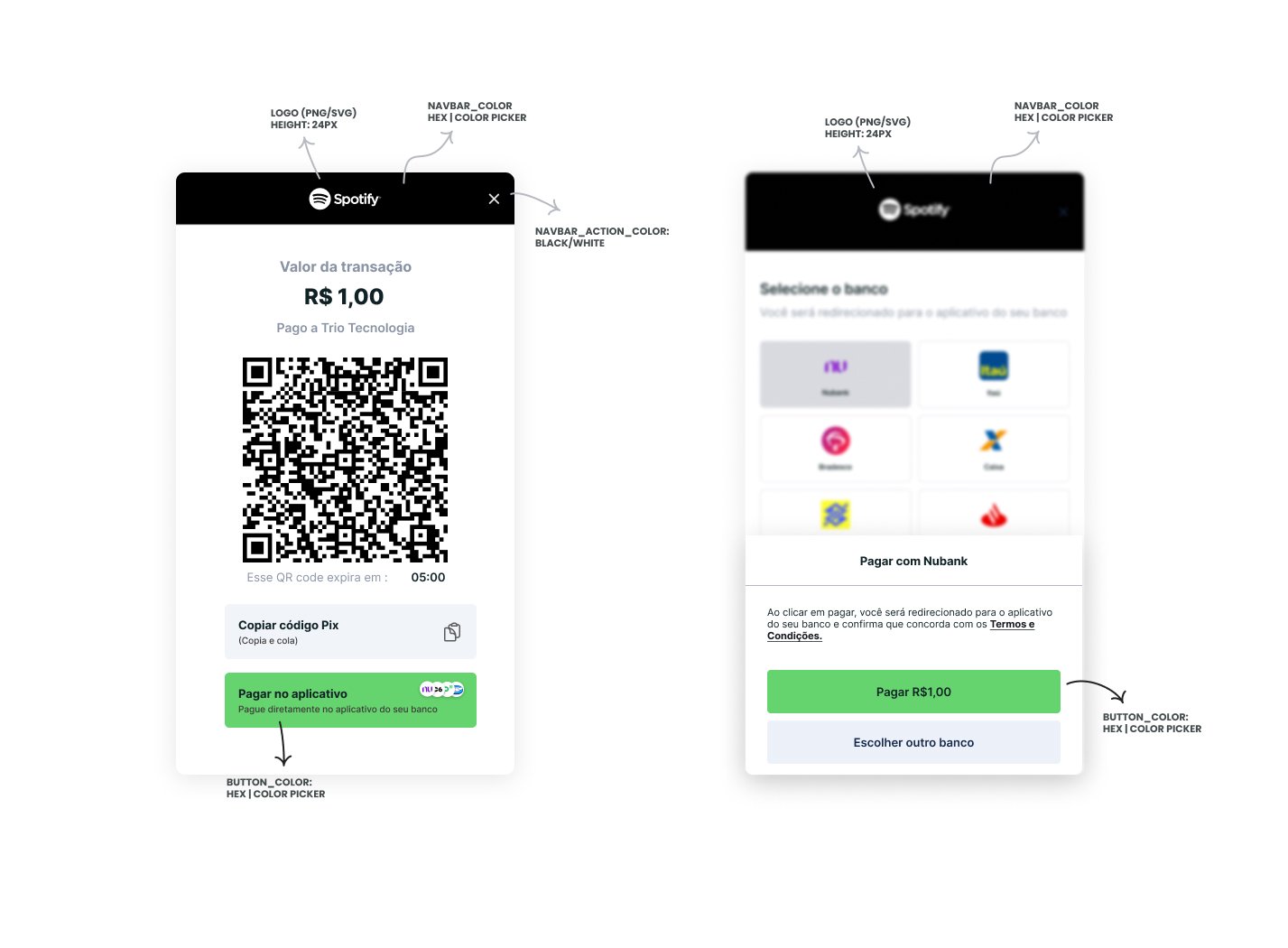 In order to create a session, you must make a `POST` request to `/checkout/sessions` with the following payload:
```json theme={null}
{
"transaction": {
"tax_number": "23725474028", // John Doe's document/tax number
"phone_number": "+5541999999999", // John Doe's Pix Key
"email": "user@trio.com.br", // John Doe's Pix Key
"name": "John Doe", // Customer name
"amount": 1, // total amount in cents
"external_id": "01H7DKA58YDWPA7ZBCCAVWFM5E", // reference for your system
"description": "Paid to example.com", // additional information about the transaction
"redirect_url": "http://your.url.here", // URL the user will be redirected after completing an open finance transaction
},
"receiver": {
"virtual_account_id": "018a66ca-0451-9cd7-1cfa-8dca325db29f" // unique identifier for the virtual account that will receive the money
},
"options": {
"session_type": "payin", // Session type (must be payin)
"expiration_in_seconds": "86400", // session expiration time, integer value
"theme": {
"colors": {
"backdrop_color": "#ffffff", //hex color for the background (optional, accepts any color)
"button_color": "#f6df69", //hex color for the interface primary action button (optional, accepts any color)
"button_label_color": "#000000", //hex color for the interface primary action text (optional, accepts only #000000 or #ffffff)
"link_color": "#426b55", //hex color for links (optional, accepts any color)
"navbar_action_color": "#ffffff", //hex color for the background (optional, accepts only #000000 or #ffffff)
"navbar_color": "#426b55" //hex color for top navbar background color (optional, accepts any color)
},
"logo_url": "https://linktologo.com/link.png" //url for the logo that will be added to the initiation flow
}
}
}
```
If you input the correct parameters, you will receive an *HTTP 200* response akin to:
```json theme={null}
{
"data": {
"company_id": "018da8cb-17da-5287-40c4-724ed90e2a0e",
"expiration_timestamp": "2024-05-04T19:44:11.960965Z",
"id": "018f4002-6d38-7d42-7c5f-c2dd50842d51",
"options": {
"allow_other_pix_key": null,
"session_type": "payin",
"theme": {
"colors": {
"backdrop_color": "#888888",
"button_color": "#15294B",
"button_label_color": "#FFFFFF",
"link_color": "#15294B",
"navbar_action_color": "#000000",
"navbar_color": "#FFFFFF"
},
"logo_url": "https://www.trio.com.br/_next/static/media/Logo.341273f5.svg"
}
},
"participants": null,
"receiver": {
"virtual_account_id": "018e3df6-d70f-9489-2c7e-ca880a25ea46"
},
"timestamp": "2024-05-03T19:50:51.960965Z",
"transaction": {
"amount": {
"amount": 1,
"currency": "BRL"
},
"available_withdraw_amount": null,
"description": "Paid to example.com",
"email": "user@trio.com.br",
"expiration_in_seconds": 86000,
"external_id": "Sessão de Teste",
"name": "John Doe",
"phone_number": "+5541999999999",
"redirect_url": "http://your.url.here",
"tax_number": "23725474028"
}
}
}
```
#### **Flow**
When making use of the Checkout, the following screens will appear:
In order to create a session, you must make a `POST` request to `/checkout/sessions` with the following payload:
```json theme={null}
{
"transaction": {
"tax_number": "23725474028", // John Doe's document/tax number
"phone_number": "+5541999999999", // John Doe's Pix Key
"email": "user@trio.com.br", // John Doe's Pix Key
"name": "John Doe", // Customer name
"amount": 1, // total amount in cents
"external_id": "01H7DKA58YDWPA7ZBCCAVWFM5E", // reference for your system
"description": "Paid to example.com", // additional information about the transaction
"redirect_url": "http://your.url.here", // URL the user will be redirected after completing an open finance transaction
},
"receiver": {
"virtual_account_id": "018a66ca-0451-9cd7-1cfa-8dca325db29f" // unique identifier for the virtual account that will receive the money
},
"options": {
"session_type": "payin", // Session type (must be payin)
"expiration_in_seconds": "86400", // session expiration time, integer value
"theme": {
"colors": {
"backdrop_color": "#ffffff", //hex color for the background (optional, accepts any color)
"button_color": "#f6df69", //hex color for the interface primary action button (optional, accepts any color)
"button_label_color": "#000000", //hex color for the interface primary action text (optional, accepts only #000000 or #ffffff)
"link_color": "#426b55", //hex color for links (optional, accepts any color)
"navbar_action_color": "#ffffff", //hex color for the background (optional, accepts only #000000 or #ffffff)
"navbar_color": "#426b55" //hex color for top navbar background color (optional, accepts any color)
},
"logo_url": "https://linktologo.com/link.png" //url for the logo that will be added to the initiation flow
}
}
}
```
If you input the correct parameters, you will receive an *HTTP 200* response akin to:
```json theme={null}
{
"data": {
"company_id": "018da8cb-17da-5287-40c4-724ed90e2a0e",
"expiration_timestamp": "2024-05-04T19:44:11.960965Z",
"id": "018f4002-6d38-7d42-7c5f-c2dd50842d51",
"options": {
"allow_other_pix_key": null,
"session_type": "payin",
"theme": {
"colors": {
"backdrop_color": "#888888",
"button_color": "#15294B",
"button_label_color": "#FFFFFF",
"link_color": "#15294B",
"navbar_action_color": "#000000",
"navbar_color": "#FFFFFF"
},
"logo_url": "https://www.trio.com.br/_next/static/media/Logo.341273f5.svg"
}
},
"participants": null,
"receiver": {
"virtual_account_id": "018e3df6-d70f-9489-2c7e-ca880a25ea46"
},
"timestamp": "2024-05-03T19:50:51.960965Z",
"transaction": {
"amount": {
"amount": 1,
"currency": "BRL"
},
"available_withdraw_amount": null,
"description": "Paid to example.com",
"email": "user@trio.com.br",
"expiration_in_seconds": 86000,
"external_id": "Sessão de Teste",
"name": "John Doe",
"phone_number": "+5541999999999",
"redirect_url": "http://your.url.here",
"tax_number": "23725474028"
}
}
}
```
#### **Flow**
When making use of the Checkout, the following screens will appear:
.png?fit=max&auto=format&n=1XTaNHmNt6qpzFit&q=85&s=b52baceaec864a2f4521a0a76bacc443)