# Pay-in
The pay-in flow shall be used whenever you want users to cash in some money with almost zero friction.
In order to generate a pay-in through our Checkout SDK, you must create a Checkout Session. Below, there are some important parameters that you will need to pay attention to (\* for required fields):
* **options**
* **`session_type`**\*: session type, in this case **payin**.
* **`expiration_in_seconds`**: integer value. If set, the Checkout session will only remain active up until this time. If not, the default time is 300 seconds (5 minutes).
* **transaction**
* **`tax_number`**\*: the document/tax number (CPF/CNPJ) that represents the person you intend to receive money from.
* **`amount`**\*: Value of the deposit. Always represented in cents.
* **`phone_number`**: Additional information about the person you intend to receive money from.
* **`email`**: Additional information about the person you intend to receive money from.
* **`redirect_url`**: the URL the user will be redirected after completing an open finance transaction. (default will be a Trio confirmation URL)
#### **White label**
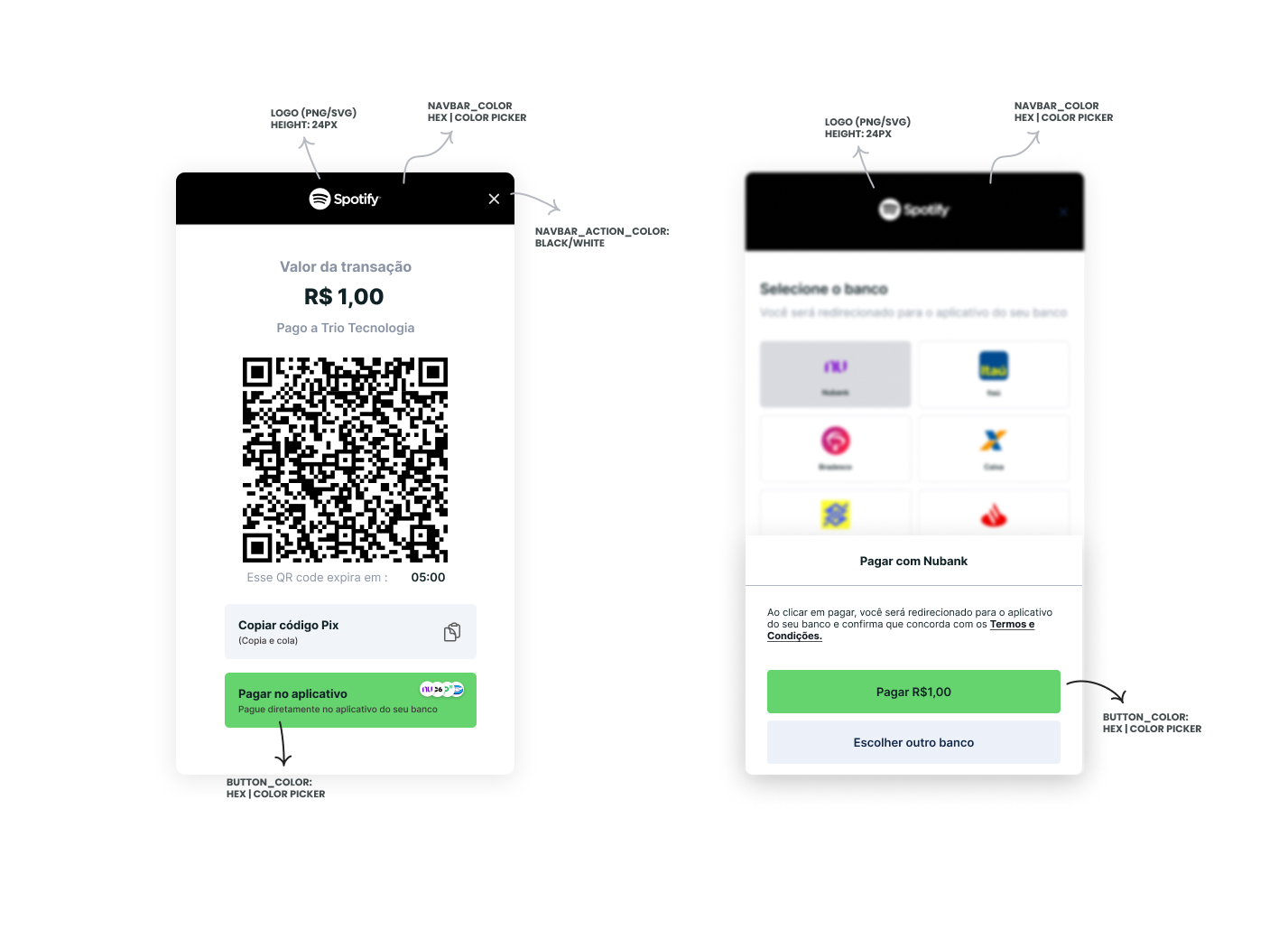
You can also customize your end-user experience by utilizing the Checkout as a *white label*. You can do so by utilizing the `options` field, with the respective `xxxx_color` fields. Below, you can see an example of a wholly implemented customization:
In order to create a session, you must make a `POST` request to [`/checkout/sessions`](https://docs.trio.com.br/reference/banking-api/checkout) with the following payload:
```json
{
"transaction": {
"tax_number": "23725474028", // John Doe's document/tax number
"phone_number": "+5541999999999", // John Doe's Pix Key
"email": "user@trio.com.br", // John Doe's Pix Key
"name": "John Doe", // Customer name
"amount": 1, // total amount in cents
"external_id": "01H7DKA58YDWPA7ZBCCAVWFM5E", // reference for your system
"description": "Paid to example.com", // additional information about the transaction
"redirect_url": "http://your.url.here", // URL the user will be redirected after completing an open finance transaction
},
"receiver": {
"virtual_account_id": "018a66ca-0451-9cd7-1cfa-8dca325db29f" // unique identifier for the virtual account that will receive the money
},
"options": {
"session_type": "payin", // Session type (must be payin)
"expiration_in_seconds": "86400", // session expiration time, integer value
"theme": {
"colors": {
"backdrop_color": "#ffffff", //hex color for the background (optional, accepts any color)
"button_color": "#f6df69", //hex color for the interface primary action button (optional, accepts any color)
"button_label_color": "#000000", //hex color for the interface primary action text (optional, accepts only #000000 or #ffffff)
"link_color": "#426b55", //hex color for links (optional, accepts any color)
"navbar_action_color": "#ffffff", //hex color for the background (optional, accepts only #000000 or #ffffff)
"navbar_color": "#426b55" //hex color for top navbar background color (optional, accepts any color)
},
"logo_url": "https://linktologo.com/link.png" //url for the logo that will be added to the initiation flow
}
}
}
```
If you input the correct parameters, you will receive an *HTTP 200* response akin to:
```json
{
"data": {
"company_id": "018da8cb-17da-5287-40c4-724ed90e2a0e",
"expiration_timestamp": "2024-05-04T19:44:11.960965Z",
"id": "018f4002-6d38-7d42-7c5f-c2dd50842d51",
"options": {
"allow_other_pix_key": null,
"session_type": "payin",
"theme": {
"colors": {
"backdrop_color": "#888888",
"button_color": "#15294B",
"button_label_color": "#FFFFFF",
"link_color": "#15294B",
"navbar_action_color": "#000000",
"navbar_color": "#FFFFFF"
},
"logo_url": "https://www.trio.com.br/_next/static/media/Logo.341273f5.svg"
}
},
"participants": null,
"receiver": {
"virtual_account_id": "018e3df6-d70f-9489-2c7e-ca880a25ea46"
},
"timestamp": "2024-05-03T19:50:51.960965Z",
"transaction": {
"amount": {
"amount": 1,
"currency": "BRL"
},
"available_withdraw_amount": null,
"description": "Paid to example.com",
"email": "user@trio.com.br",
"expiration_in_seconds": 86000,
"external_id": "Sessão de Teste",
"name": "John Doe",
"phone_number": "+5541999999999",
"redirect_url": "http://your.url.here",
"tax_number": "23725474028"
}
}
}
```
#### **Flow**
When making use of the Checkout, the following screens will appear:
---
# Agent Instructions: Querying This Documentation
If you need additional information that is not directly available in this page, you can query the documentation dynamically by asking a question.
Perform an HTTP GET request on the current page URL with the `ask` query parameter:
```
GET https://docs.trio.com.br/guides/sdk/flows/pay-in.md?ask=
```
The question should be specific, self-contained, and written in natural language.
The response will contain a direct answer to the question and relevant excerpts and sources from the documentation.
Use this mechanism when the answer is not explicitly present in the current page, you need clarification or additional context, or you want to retrieve related documentation sections.